
SDMove
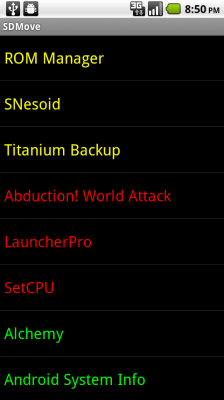
One of the most welcome additions in Android 2.2, especially for those of us running phones with a pathetically small amount of internal memory, is the ability to offload applications to the SD Card. This still requires the developer to flip a switch to allow the move, and while some developers were a bit slow to adopt the feature, more and more are starting to realize that this is something people might want to use.
How do you go about moving your hundreds of applications to external storage? By default, the only way is to go through the applications list, click on each individual application, and click the ‘Move to SD Card’ button if it’s not grayed out. Thankfully, one guy noticed this limitation and created a simple, amazingly effective application.SDMove presents you with a list of all the applications you have installed, color coded based on each application’s SD Card status. Green apps are currently located on external storage, yellow apps aren’t on the SD card but can be moved there, and red apps aren’t allowed to be moved either because the developer has specifically flagged it as unmovable or hasn’t bothered to set a flag at all. There are a few other colors as well, and a full legend can be found in the ‘About’ section of the menu.
It doesn’t pack much flash, but SDMove does what it advertises and can save you a lot of time and frustration. Best of all, it’s completely free (if you don’t mind looking at the usual ads)! If you recently updated to Froyo and want to see what apps you can move, or if you’ve already moved some apps and want to see how much more space you can save, scan the QR code below to be taken directly to SDMove’s Market page.



0 comments:
Post a Comment